
BUSINESS
How to Fix WD Hard Drive Not Showing up on Mac – 2025 Tips


[Fixed] Western Digital Hard Drive Not Showing up on Mac
“I dug up an old hard drive and, upon connecting it with my Mac, it doesn’t appear on Finder but appears on Disk Utility. Though it appears to be greyed out. Why is my Western Digital hard drive not showing up on Finder, and is there any fix for it?”
___A Question from Reddit
When your Western Digital hard drive is not detected on your Mac, other than fixing it, rescuing files from it is more challenging. But why does this happen? Don’t worry, though. In this post, we’ll provide an explanation of WD drive non-recognition causes and data recovery solutions based on numerous use cases.
Part 1: Why Is My Western Digital Hard Drive Not Showing Up?
You might be thinking, “Why is my Western Digital hard drive not showing up on Mac?” The answer to that is that there are many scenarios where a Western Digital hard drive is not detected on Mac. Sometimes, it won’t show up on Desktop/Finder, or may or may not appear on Disk Utility. This can hppen due to numerous reasons, such as:
- Loose Connection: The USB cable, port, or adapter might be faulty or not properly connected.
- Power Issues: The drive might need more power than the USB port can provide.
- Incompatible Format: If the drive is formatted for Windows (like NTFS), macOS might not read it without extra software.
- Outdated Software: Old drivers or software can cause connection problems.
- Drive Hardware Problems: The hard drive itself might be damaged.
- Rare Virus Problem: Malware can sometimes block drive access.
Part 2: How to Recover Data From a WD Hard Drive That Won’t Show Up?
When a WD external hard drive is not showing up on a Mac, extract data from it to avoid permanent loss. Otherwise, this might happen if you apply the solutions first, e.g., formatting the disk. You’ll need a specialized Mac data recovery tool that can actually detect the WD hard drive not showing up on Mac and retrieve files from it.
4DDiG Mac Data Recovery is a professional file rescue tool that supports extraction from inaccessible internal and external drives, like the WD, with a high success rate. Besides, you can pick the file types you wish to retrieve and examine them after they’re recovered. Here’s more about this app in detail:
- The recovery app enables restoration from different external storage mediums, including hard drives, SD cards, and USBs, among others.
- The software provides complete recovery support to all major brands, including Western Digital, Seagate, Samsung, LaCie, and more.
- The external disk recovery software provides support for more than 2000 different file types, e.g., audio, video, document, and image formats, along with many more.
- It supports the latest macOS Sequoia and T2, and M series chips.
Here’s how to use this tool to recover files from an inaccessible WD external drive:
Step 1: Connect the inaccessible WD drive to your Mac for access. Then, execute the Mac WD drive recovery tool on your computer.
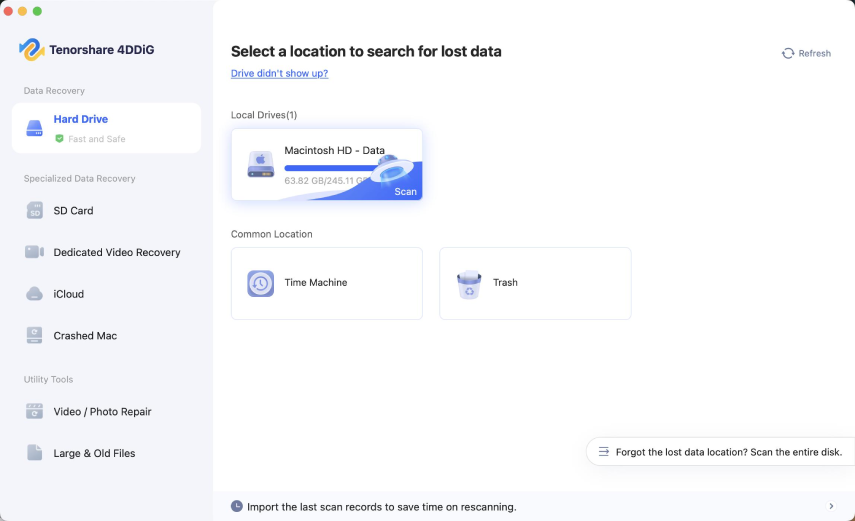
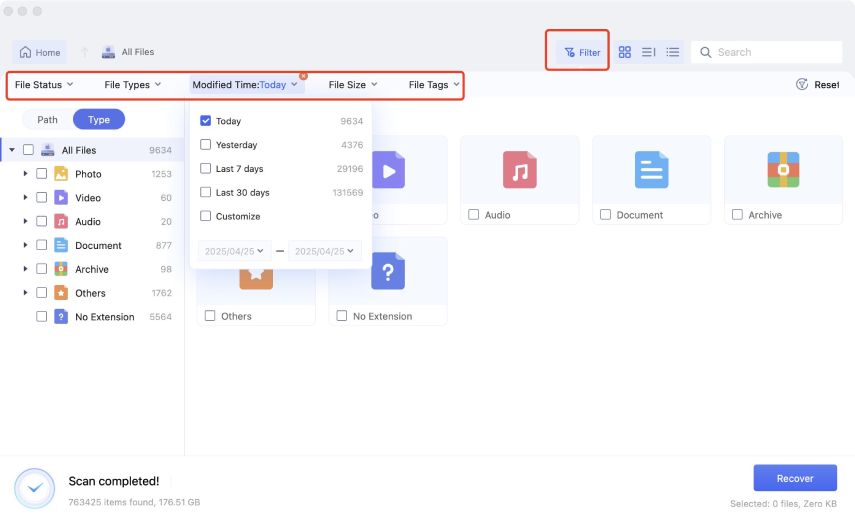
Step 2: Pick the WD drive and file types to scan. Then, hit “Scan.” Pause or stop the scan to locate the files by filtering out results, e.g., with “Modified Time,” “File Size,” etc. You can also enter keywords in the top-right search box to find matching files.
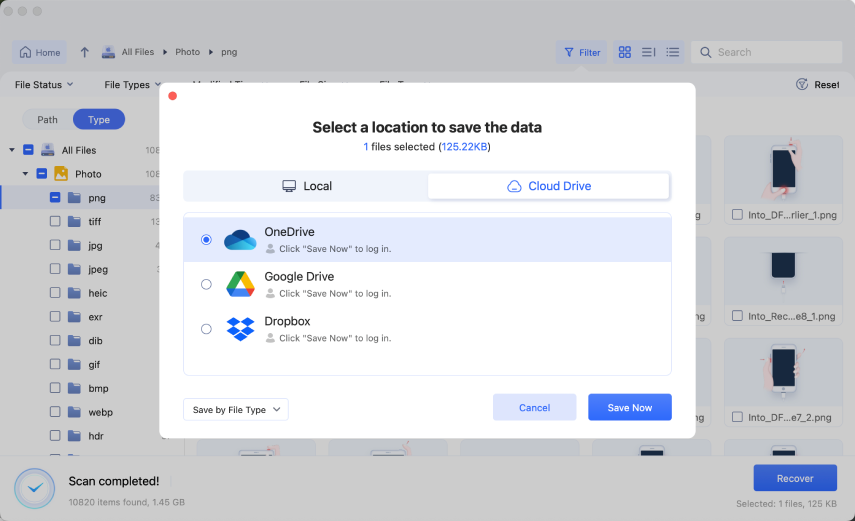
Step 3: Hit “Recover” to move the recovered data from WD to a secure place on your Mac or cloud drive account.
Part 3: Basic Checks Before Fixing WD Hard Drive Not Showing up on Mac
Try basic checks first when your Western Digital external drive is not showing up on Mac. Most of the time, they can fix WD external hard drive and you won’t need to tread into advanced solutions. Here they are:
- Try Another USB Port or Cable: Plug the drive into a different USB port or use a different cable. Make sure it’s the correct type for your drive.
- Test on Another Computer: Connect the drive to another computer to see if it works there. This helps rule out issues with your Mac.
- Check the Drive’s Light: Look for the power light on the drive. If it’s off, the drive might not be getting power.
- Use a Different Power Outlet: Try a different wall outlet to make sure the drive is getting enough power.
- File Format Compatibility: Make sure the drive is in a format macOS can read. NTFS drives may need extra software to work fully on a Mac.
Part 4: Methods to Fix Western Digital Hard Drive Not Showing up on Mac
If basic checks are unable to fix WD external hard drive not detected on Mac issue, proceed to advanced solutions.
Case 1: WD Hard Drive Isn’t Showing up in Finder/on the Desktop
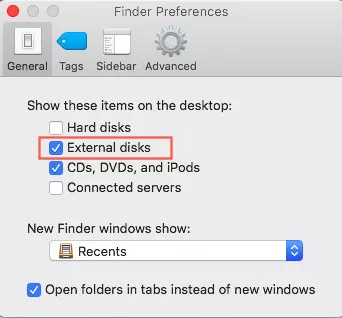
Your Finder Preferences might be set to exclude external disks from appearing on the Finder/Desktop. This might be why the WD external hard drive is not showing up on Mac. You can enable the disk to apear on the Finder/Desktop in the Finder Preferences. To do so:
Step 1: Head to “Finder.” Then, choose “Preferences.” Tap “Sidebar.”
Step 2: Then, tick mark “External disks” beneath “Locations.”
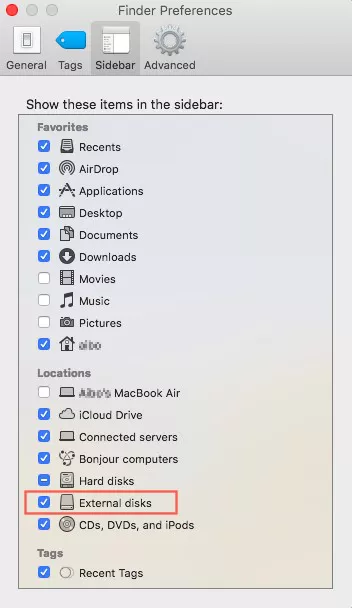
Step 3: Go back to “Preferences.” Next, select “General.” Tick mark “External disks.”
Case 2: WD Hard Drive Is Detected but Not Accessible in Disk Utility
Fix 1: Manually Mount the External Hard Drive
If your Western Digital external drive is not mounted on your Mac, you can manually mount it in Disk Utility. To do so:
Step 1: Connect the inaccessible WD drive to your Mac for access. Then, Execute “Disk Utility.” Right-click the WD drive. Tap “Mount.”
Step 2: When the disk is successfully mounted, it will show up on the Desktop and you will be able to access it without trouble.
Fix 2: Run First Aid on Your Drive
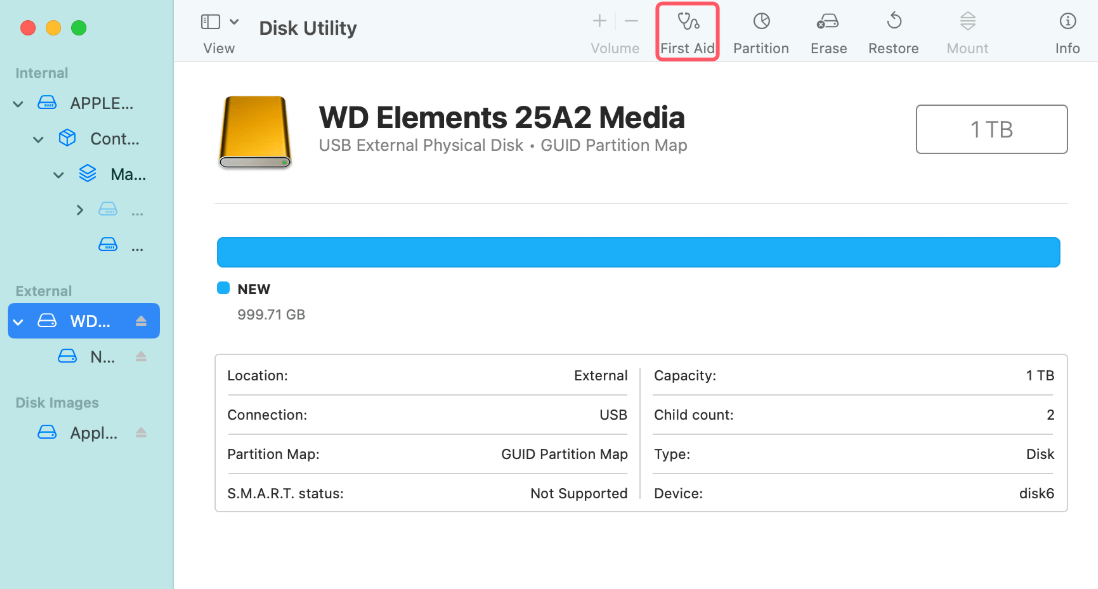
When your WD external drive is unable to be manually mounted on the Mac, it might be because of some errors that are preventing its mounting procedure. You can fix them through Mac’s built-in First Aid tool. Here’s how:
Step 1: Connect the inaccessible WD drive to your Mac for access. Then, Execute “Disk Utility.”
Step 2: Tap the WD disk. Next, choose “First Aid” from the above menu. Hit “Run.”
Fix 3: Format the Hard Drive
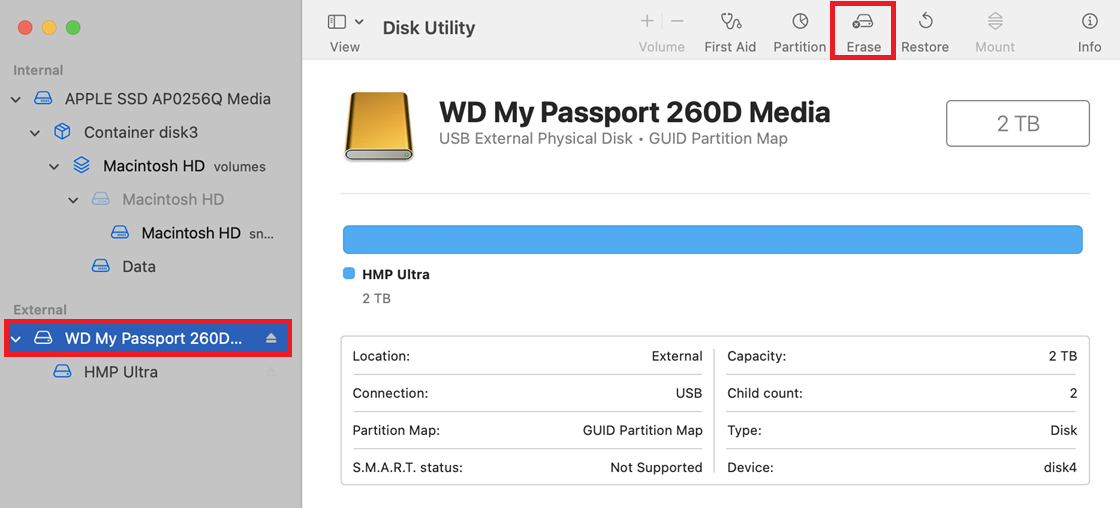
Even if First Aid can’t repair the WD external drive, its file system or partition might be corrupted. So, you’ll need to format the disk. To do so:
Step 1: Connect the inaccessible WD drive to your Mac for access. Then, Execute “Disk Utility.”
Step 2: Tap the WD disk. Next, choose “Erase” from the above menu. Choose a “Name” and “Format,” e.g., APFS Format. Hit “Erase” again.
Case 3: WD Hard Drive Isn’t Showing u
p In Disk Utility
Fix 4: Boot into Safe Mode
Recently installed apps can interfere with the disk, resulting in the Western Digital external drive not showing up on Disk Utility. So, you can enter into Safe Mode to examine whether the WD drive appears there and uninstall the interfering apps. To do so:
Intel Macs:
Step 1: Shut down your Mac and wait 10 seconds. Then, switch it on.
Step 2: Immediately hold the “Shift” key. Let go when you see the login screen.
Step 3: Connect the inaccessible WD drive to your Mac for access and examine if it appears in the Disk Utility.
Apple Silicon Macs:
Step 1: Shut down your Mac and wait 10 seconds. Press and hold the “Power” button until you see startup options.
Step 2: Select the startup disk. Next, hold “Shift.” Click “Continue in Safe Mode.” Then, release “Shift.”
Step 3: Connect the inaccessible WD drive to your Mac for access and examine if it appears in the Disk Utility.
Fix 5: Rset the NVRAM
NVRAM stores important Mac settings like volume and display preferences. If they’re corrupted, they can cause the ‘WD hard drive not showing up on Mac’ problem. So, you can reset them. Here’s how to do that:
Step 1: Click the “Apple logo” on your Mac. Then, choose “Restart.” When the screen goes black, press and hold “Option + Command + P + R.”
Step 2: Keep holding these keys until you hear the startup sound twice or see the Apple logo appear and disappear twice.
Step 3: Connect the inaccessible WD drive to your Mac for access and examine if it appears in the Disk Utility.
Fix 6: Contact a Professional
If all else fails to resolve the ‘WD external hard drive not showing up’ on Disk Utility issue, the problem might be due to hardware. Therefore, contact an external disk repair service to fix it.
Bottom Line
If you were wondering, “Why is my Western Digital hard drive not showing up in Disk Utility or on Finder, we’ve clarified in this post. But before trying to fix the Western Digital hard drive is not detected on your Mac, which might erase your data, use 4DDiG Mac Data Recovery. It’s a user-friendly tool that helps recover files from drives your Mac can’t read, making it a safe first step.

A credit card is designed to buy things, not to produce cash — yet nearly every card offers some way to turn its limit into money you can hold. Cash advances at ATMs, convenience checks mailed with statements, balance transfers deposited to a bank account, and various informal workarounds all promise the same thing: liquidity now, repayment later. What separates a reasonable emergency tool from an expensive mistake is understanding exactly how each mechanism is priced, where the limits sit, and what alternatives exist before you tap any of them. This guide walks through the mechanics in plain terms.
How a Cash Advance Actually Works
When you withdraw cash against a credit card, you are not making a purchase; you are triggering a separate lending product with its own rules, and those rules are almost universally worse than the ones governing ordinary spending.
Start with the fee. Most issuers charge an upfront cash advance fee, typically calculated as a percentage of the amount withdrawn with a fixed minimum. That fee applies the moment the money leaves the machine, regardless of how quickly you repay.
Then comes the interest treatment, which is where most cardholders get surprised. Purchases usually enjoy a grace period: pay the statement in full and no interest accrues. Cash advances almost never do. Interest begins accumulating on day one, and the rate applied is usually the card’s cash advance APR, which is set meaningfully higher than the purchase APR on the same account. Add the ATM operator’s own surcharge, and the effective cost of holding advance money for even a few weeks becomes substantial.
Limits matter too. The amount available for cash is normally a subset of your total credit line — often a fraction of it — so a card with plenty of open-to-buy may still permit only a modest withdrawal. Issuers also treat heavy cash advance usage as a risk signal. It does not appear as a special mark on your credit report, but it raises utilization, and internally it can influence how a lender views the account.
None of this makes cash advances irrational in every case. For a genuine emergency measured in days, a small advance repaid immediately can be cheaper than a bounced payment or a missed obligation. The product fails people when it becomes routine.
The Gray Zone: Turning Purchases Into Cash
Because official advances are expensive, an informal workaround economy has grown up alongside them: using the card’s purchase function to acquire something easily resold, then converting that item into cash. The most common vehicle is the gift card or prepaid voucher — bought on credit at face value, sold to a buyer or an exchange platform at a discount, with the cardholder pocketing the difference as immediate cash.
This pattern exists worldwide, but it is especially well documented in Korea, where it is common enough to have its own name: consumers there call the practice 신용카드깡, literally the conversion of card credit into cash through merchant transactions or voucher resale. Understanding why the term exists is instructive even for readers elsewhere, because the same economics apply in any market.
The apparent appeal is that a purchase avoids the cash advance fee and, at least initially, the day-one interest clock. The real costs simply move elsewhere. First, the discount: reselling a voucher below face value is itself a fee, frequently comparable to or larger than the official advance fee it replaces. Second, the repayment reality: the full face value lands on your statement, but you received less than face value in cash, so you are repaying money you never got to use. Third, the compliance risk: card networks and issuers prohibit disguised cash-out transactions, and accounts flagged for the pattern can face limit cuts or closure. In several jurisdictions, businesses that facilitate inflated or fictitious transactions for cash-out purposes operate illegally, and consumers who participate can be drawn into disputes with no protection. Finally, there is counterparty risk — handing valuable codes to an unverified buyer is a well-worn scam scenario.
The consumer-education takeaway is not that stored-value markets are inherently bad; legitimate platforms for selling genuinely unwanted gift cards serve a real purpose. The distinction lies in intent and structure. Selling a card you already own and do not need is ordinary liquidation. Systematically buying vouchers on credit in order to manufacture cash is a high-cost loan wearing a disguise, and it should be evaluated — and usually rejected — on exactly those terms.
Cheaper Doors Worth Trying First
Before converting any part of a credit line into cash, walk through the alternatives in rough order of cost.
Ask your employer about earned wage access or a payroll advance; where offered, these are among the cheapest liquidity tools available. Check whether your bank or credit union offers a small-dollar loan or an overdraft line — regulated products whose disclosed rates, while not trivial, are typically far below cash advance territory. A personal loan, even a small one, converts short-term stress into a fixed schedule at a fixed rate. If the need is bill-specific, contact the biller: payment plans for medical, utility, and tax obligations are more available than most people assume, and often interest-free.
If a card must be involved, prefer mechanisms with transparent pricing. A promotional balance transfer deposited to your account discloses its fee upfront. Even a plain cash advance, kept small and repaid within days, at least has the virtue of honest math.
Credit card cash access is best understood as a spectrum of loans that get more expensive as they get more convenient and more opaque. The official advance is costly but visible. The informal conversion route is costly and hidden. The habit that protects you is the same in every country: before taking cash from a card by any door, calculate the true total cost — fees, discounts, and interest to the realistic payoff date — and compare it against one boring alternative. Most of the time, the boring option wins.
In today’s fast-paced world, customer experience (CX) has emerged as a vital ingredient for business success. Companies that prioritize CX not only stand out from the competition but also build lasting relationships with their customers. But what does it take to elevate your customer experience to new heights? Enter BinusCX—a groundbreaking approach designed to innovate and enhance every interaction between businesses and their clients.
Whether you are a seasoned entrepreneur or just starting on your business journey, understanding how BinusCX can reshape your strategy is essential. Get ready to dive into the essentials of this transformative tool, explore its key features, and discover real-world examples of companies reaping its benefits!
Understanding Customer Experience (CX)
Customer experience (CX) refers to the overall perception customers have of a brand based on their interactions. It encompasses every touchpoint, from initial awareness to post-purchase engagement.
At its core, CX is about understanding and meeting customer needs. This means listening actively and responding effectively at each stage of the buyer journey.
A great CX goes beyond mere satisfaction; it creates emotional connections that foster loyalty. Customers who feel valued are likelier to return and recommend your brand.
In today’s digital landscape, expectations are higher than ever. Consumers seek personalized experiences that resonate with them individually.
Businesses need to embrace this shift by creating seamless journeys across multiple channels—whether online or offline. By doing so, they can turn casual buyers into passionate advocates for their brands, paving the way for long-term success in an increasingly competitive market.
The Importance of CX in Business Success
Customer experience (CX) is a vital driver of business success in today’s competitive landscape. Companies that prioritize CX often see enhanced customer loyalty and increased revenue. Satisfied customers are more likely to return and recommend your brand to others.
Moreover, positive experiences can set you apart from competitors. In markets saturated with similar products, exceptional CX becomes a key differentiator. It fosters trust and emotional connections between the consumer and your brand.
Investing in CX not only boosts satisfaction but also reduces churn rates. When customers feel valued, they are less inclined to switch brands for minor advantages elsewhere.
Additionally, effective customer experience strategies provide valuable insights into consumer behavior. Understanding preferences helps businesses adapt their offerings to meet evolving demands, ensuring long-term growth and sustainability within the market.
What is BinusCX and How Does it Work?
BinusCX is an innovative platform designed to enhance customer experience across various business sectors. It leverages advanced technology to streamline interactions between companies and their customers.
The platform uses data analytics to gain insights into customer behavior. This allows businesses to tailor their services for better engagement. By identifying trends, BinusCX helps organizations anticipate needs before they arise.
Users can access multiple tools within the platform. These include feedback loops, journey mapping, and performance metrics. Each feature empowers teams to make informed decisions based on real-time information.
Integration with existing systems is seamless, ensuring that businesses don’t face disruption during implementation. With BinusCX, companies can foster a culture of continuous improvement in customer relations while staying ahead of market demands.
Key Features and Benefits of BinusCX
BinusCX stands out with its user-friendly interface, making it easy for businesses to navigate. This simplicity encourages teams to engage more deeply with the platform.
Another key feature is real-time analytics. Companies can track customer interactions as they happen, allowing for swift adjustments in strategy. Data-driven decisions become a breeze.
Customization options are abundant, enabling brands to tailor their CX solutions according to specific needs. This flexibility is crucial in today’s diverse market landscape.
Moreover, BinusCX promotes seamless integration with existing systems. Businesses can enhance their current workflows without disruptive overhauls or significant downtime.
Collaboration tools within BinusCX foster teamwork among departments. A unified approach ensures that everyone from marketing to support works toward a shared vision of exceptional customer experience.
Continuous updates and enhancements keep the platform ahead of industry trends, ensuring users benefit from the latest innovations in customer experience management.
Case Studies: How Companies Have Utilized BinusCX to Improve CX
Several companies have successfully harnessed the power of BinusCX to elevate their customer experience.
A leading retail brand utilized BinusCX analytics to identify pain points in their shopping journey. By implementing personalized recommendations, they saw a 20% increase in conversion rates within just three months.
In the hospitality sector, a hotel chain adopted BinusCX for real-time feedback from guests. This proactive approach enabled them to address complaints immediately, resulting in increased guest satisfaction scores and positive reviews across online platforms.
Another tech startup integrated BinusCX to streamline its customer support process. With automated responses and an intuitive interface, response times decreased by over 30%, allowing agents to focus on complex issues.
These case studies illustrate how diverse industries leverage BinusCX as a catalyst for improvement. Each organization was able to tailor strategies that align with their unique goals while enhancing overall engagement with customers.
Implementation and Integration of BinusCX in Your Business
Implementing BinusCX in your business can be a transformative experience. Start by evaluating your current customer experience strategy. Identify areas that need improvement, and set clear goals for what you want to achieve with BinusCX.
Next, integrate the platform with your existing systems. This could involve syncing tools like CRM software or marketing automation platforms. Seamless integration is crucial for maximizing efficiency.
Training your team is essential as well. Ensure they understand how to use BinusCX effectively and are familiar with its features. Conduct workshops or provide resources to facilitate this learning process.
Monitor progress regularly. Use data analytics provided by BinusCX to assess improvements in customer satisfaction and engagement levels. Continuous assessment will help refine strategies over time, ensuring long-term success in enhancing customer experiences.
Conclusion
Customer experience is a vital aspect of any successful business strategy. Understanding and enhancing CX can lead to lasting customer loyalty, increased revenue, and a strong market presence. BinusCX emerges as an innovative solution in this landscape, offering tools designed for businesses eager to elevate their customer interactions.
The platform’s features provide powerful insights that guide companies towards making informed decisions. By leveraging data analytics and user-friendly interfaces, BinusCX empowers organizations to understand their customers better than ever before.
As illustrated through various case studies, many businesses have transformed their CX practices by integrating BinusCX into their operations. The results speak volumes: improved satisfaction rates and higher retention levels showcase the tangible benefits of adopting this approach.
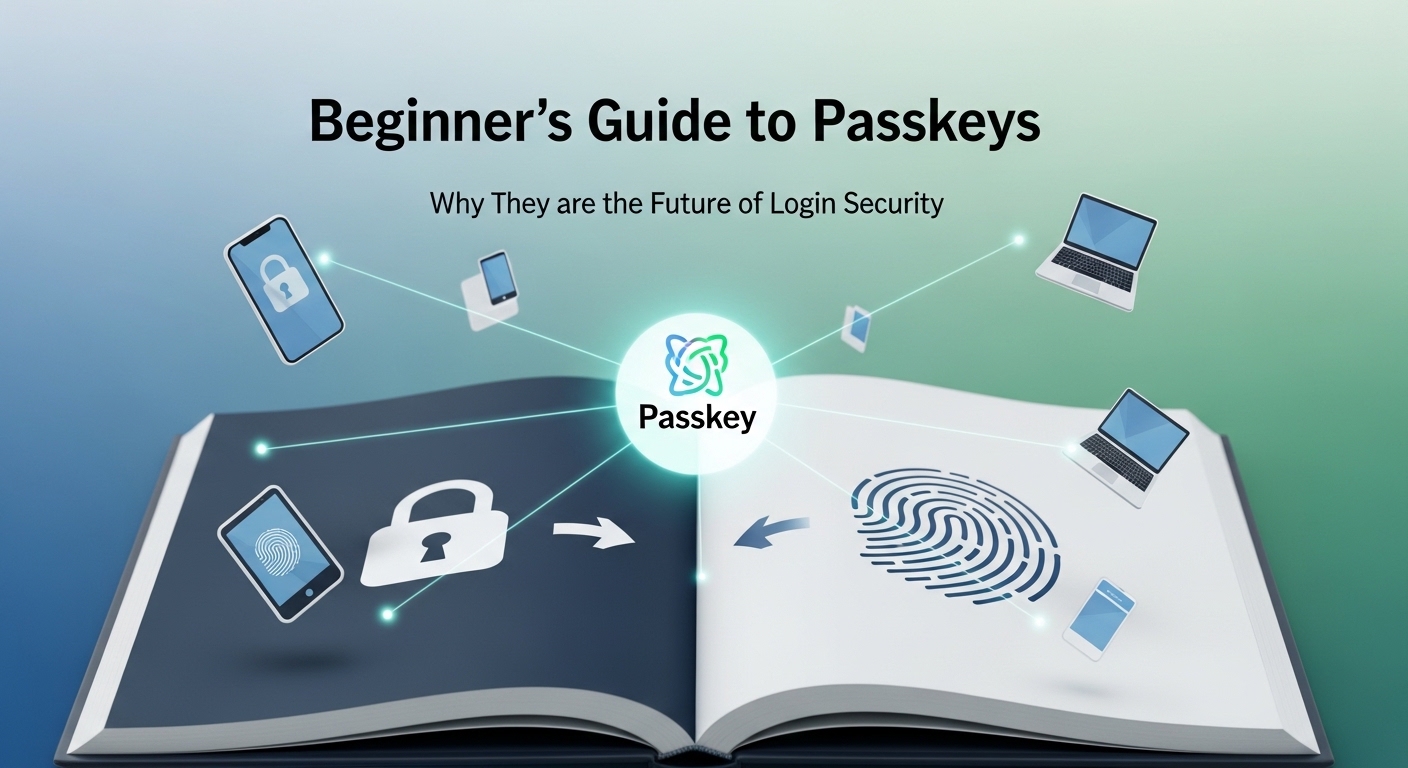
Passkeys have become the reason that the days of memorising long passwords are behind us. Authentication is now safer, more seamless, and a little more sophisticated. Understanding what is passkey, and how it works on a fundamental level is important for anyone who is doubtful about its usability. While the term and the process itself might seem very technical, it’s quite simple—and that is what we’ll explain in this blog.
How Passkeys Work (Without the Tech Jargon)
To explain it simply, a passkey is like a digital handshake between your device and the service that you’re logging into. Step by step, here’s how it looks:
- You register, and your device generates both a public and a private key.
- The private key is on your device and stays there. It is not accessible to anyone else.
- The public key, on the other hand, is shared with the service, so it’s in the server.
When you log in, the service sends a cryptographic challenge that only a private key can sign. This signed challenge is then sent back to the server, which verifies it using the corresponding public key. At no point in this process is a traditional password generated, shared, or stored externally. This explains What is passkey in practice—a secure authentication method where credentials remain protected on the user’s device, making them immune to interception, phishing, or credential theft.
To make the correlation easier to understand, think of it like proving ownership of a safe without opening it. The server knows that it belongs to you, and no one else can open it. So you intermediate a process that is secret to the two of you.
Why Hackers Can’t Steal What You Don’t Know
Passkeys have an innate advantage—they are inherently phishing-resistant. Traditional credentials, such as passwords, can be stolen through fake or look-alike websites, but passkeys are cryptographically bound to the correct origin. This is a key part of what is passkey security. Even if a user is tricked into visiting a malicious site, the private key stored on the device will refuse to authenticate because the domain does not match the registered public key, effectively blocking phishing attacks at the source.
The thing with passwords is that if you guess the correct one, you have access to what you’d call basically the whole online presence of a person. Passkeys, on the other hand, cannot be used like that.
One, each login uses a unique cryptographic challenge, so even if a response were intercepted, it couldn’t be reused. Secondly, the private key never works in isolation—authentication is only possible when the server verifies it against the matching public key. The design works on a very fundamental security model. So instead of relying on human vigilance and hackers benefiting from the fatigue of it, this cryptographic system helps you stay secure with minimal effort.
One Key, All Devices
One concern with device-bound credentials is mobility. Modern passkey systems solve this with secure syncing.
- Passkeys can move across devices within a trusted ecosystem.
- The private key can be securely synced across trusted devices using end-to-end encrypted cloud services, without exposing it in readable form.
- When you log in from a new device, the system verifies your identity and provisions access without exposing the private key.
This means your passkey is portable but never exposed, allowing smooth access from phones, tablets, laptops, or desktops.
What If You Lose Your Phone? What’s the Recovery Process
This is a common concern, but Passkey anticipates it. Recovery can be done via trusted backup devices and cloud-synced credentials.
- If one device is lost, your other devices or secure cloud backups can generate a new key pair.
- The old key is revoked, preventing unauthorised access.
- Recovery is user-driven but cryptographically enforced, ensuring security isn’t compromised even during emergencies.
This approach removes the fear of being locked out and losing your data. This thing is common with both passwords and passkeys; they’re recoverable.
Goodbye MFA, Speeding Up Your Login Without Losing Safety
Passkeys combine authentication and verification in one step, removing the need for separate multi-factor prompts, such as SMS codes or authenticator apps, in many cases.
- Device authentication (biometric or PIN) acts as both “something you have” and “something you are”.
- This simplification reduces friction without reducing security.
- Users can authenticate in seconds while organisations maintain cryptographically strong login guarantees.
Essentially, passkeys achieve passwordless, MFA-equivalent security automatically.
Setting the Foundation: What You Gain From Using Passkeys
By understanding and adopting passkeys, users and organisations benefit from:
- Elimination of shared secrets, making stolen passwords obsolete.
- Strong cryptographic authentication that is origin-bound and phishing-resistant.
- Seamless multi-device access without compromising security.
- Streamlined user experience, removing friction from login flows.
- Passkeys help organisations meet modern authentication and security control requirements found in many compliance frameworks.
These features make passkeys not just a replacement for passwords but a redefinition of digital identity itself.
Conclusion
By now, you know the answers to – What is passkey and how can it benefit you? Passkeys can provide a stronger, faster, and more intuitive alternative to traditional passwords in terms of authentication. They are smart, reliable, and require minimal effort from your end. Remembering passwords can be a hassle, and that is something you do not have to worry about anymore. Passkeys do the heavy lifting for you, here
-

 HEALTH3 years ago
Transformative Health Solutions: Unveiling the Breakthroughs of 10x Health
-

 Posts3 years ago
Siegel, Cooper & Co.
-

 GENERAL3 years ago
Discovering the Artistic Brilliance of Derpixon: A Deep Dive into their Animation and Illustration
-

 Lifestyle3 years ago
Purenudism.com: Unveiling the Beauty of Naturist Lifestyle
-

 FASHION3 years ago
The Many Faces of “λιβαισ”: A Comprehensive Guide to its Symbolism in Different Cultures
-

 Lifestyle3 years ago
BaddieHub: Unleashing Confidence and Style in the Ultimate Gathering Spot for the Baddie Lifestyle
-

 Home improvement2 years ago
Unleash Your Creative Side: Exploring Stylish Rug Collections to Elevate Your Space with Quality Rug & Carpet Options
-

 PETS2 years ago
From Bows to Bandanas: Elevate Your Dog’s Style Game with These Trendy Accessories